Open source · MIT · Linux and Windows

NostaleBot let an AI agent play NosTale

An open-source NosTale bot and packet logger with an MCP server. Claude or any other AI agent reads the game world and plays through the game's own client: it walks, fights, casts spells and picks up loot, and the server confirms each step, hit and pickup.

  • 20 MCP tools for agents
  • 779 map grids parsed
  • 8-dir A* pathing
  • 1,964 skills in the catalog

github.com/TaraJura/NostalePacketLogger

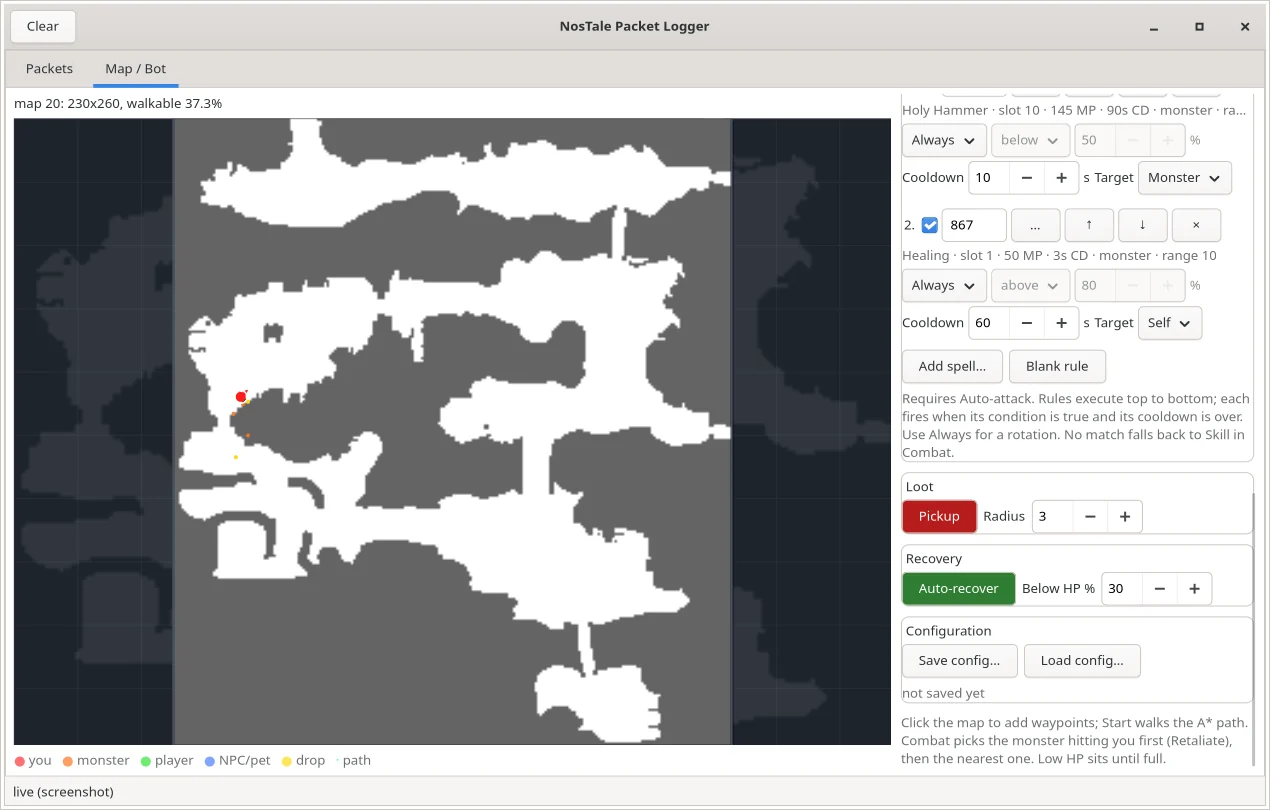
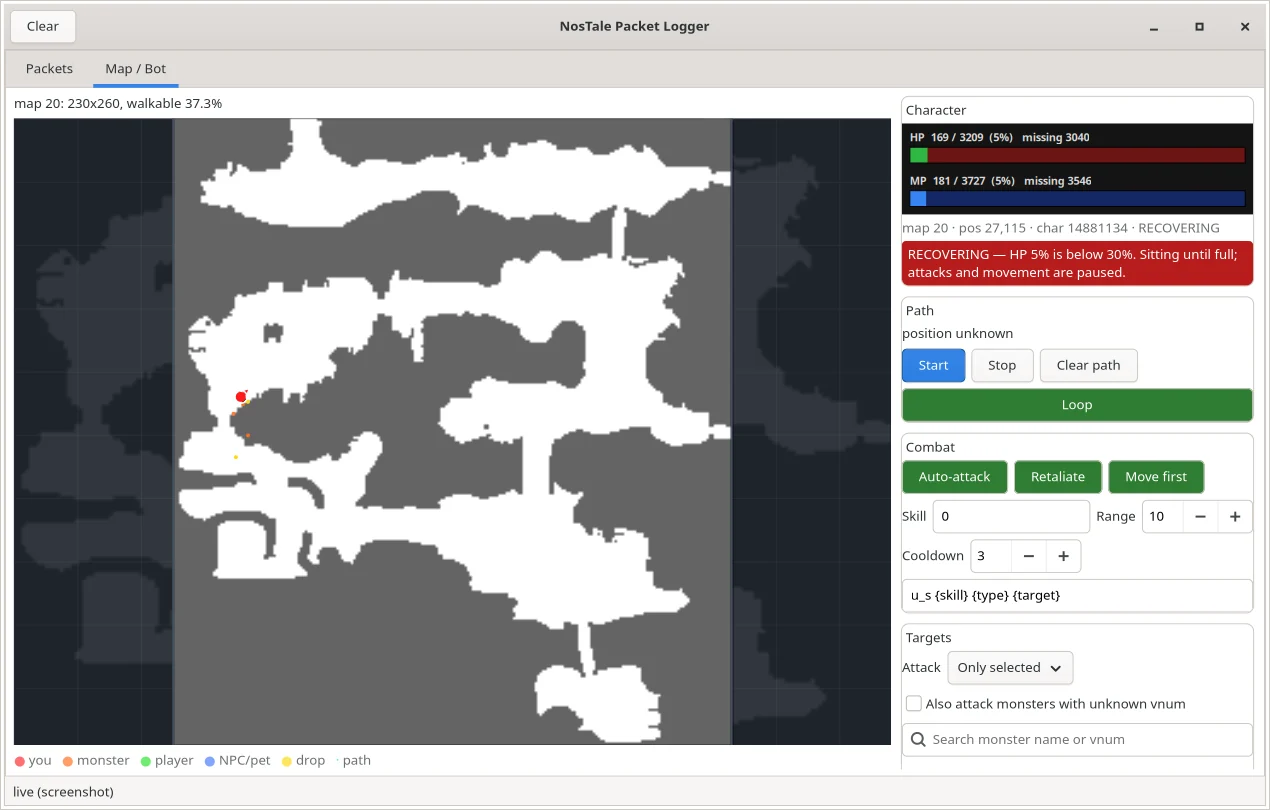
NostaleBot GTK4 window: the NosTale map 20 with the character, monsters and drops, HP and MP bars, a red recovering banner and the combat toggles
The Map / Bot tab on map 20: live HP and MP, the recovery banner and the combat toggles.

Let an AI agent play NosTale

The MCP server turns the game into tools an agent can call. The agent reads the world, decides, acts, and waits for the server to confirm. You watch the same session in the window.

  1. AI agentClaude Code or any MCP client
  2. ntpl mcpstdio JSON-RPC, 20 tools
  3. 127.0.0.1:47821loopback TCP to the DLL
  4. DLL in the clientgame's own send and MoveTo
  5. NosTalewalks, fights, loots

Quick start for agents

Get the code and build it

Clone the repository and build the in-game DLL and the injector with the 32-bit MinGW compiler.

git clone https://github.com/TaraJura/NostalePacketLogger.git
cd NostalePacketLogger
sudo apt install g++-mingw-w64-i686
make -C linux all

Start NosTale and inject the DLL

Start the game in its Wine prefix, inject, and check the hooks. Both recv and send should say ACTIVE.

linux/scripts/inject.sh
linux/scripts/host.sh status

Connect your AI agent over MCP

Install the Python host and register it as a stdio MCP server. In Claude Code it is one command; any other MCP client takes the same command in its config.

python3 -m venv .venv
.venv/bin/pip install -e linux/host
claude mcp add nostale -- "$PWD/.venv/bin/ntpl" mcp
Config for other MCP clients
{
  "mcpServers": {
    "nostale": {
      "command": "/path/to/NostalePacketLogger/.venv/bin/ntpl",
      "args": ["mcp"]
    }
  }
}

Watch the agent play

The MCP server owns the link to the DLL and shares it on port 47822, so the window shows the same session the agent controls. Give the agent a goal and keep an eye on its HP.

linux/scripts/gui.sh --port 47822

The 20 MCP tools

Read the world

game_state
map, position, HP and MP, sitting, skills, portals
game_entities
players, NPCs and monsters with name, vnum and distance
game_drops
items on the ground with their owner
game_map
grid size and walkable share
game_portals
portals of a map and where they lead
game_path
8-direction A* path as a list of cells
game_spells
learned skills with range, cast time, cooldown and MP
game_status
DLL link and hook state

Act

game_move
walk to a cell through the client's MoveTo
game_travel
cross a whole map in short A* legs
game_rest
sit down or stand up
game_select
select a target
game_attack
normal attack, waits for the server's hit
game_cast
cast by skill slot
game_cast_spell
cast by Skill.dat vnum
game_pickup
pick up a drop, waits for the server

Low level

game_send
send one raw game packet
game_wait_for
wait for a packet, e.g. c_map after a portal
game_memory_find
read-only: find a value in game memory
game_memory_read
read-only: dump up to 256 bytes

Plus the resource ntpl://game/state with the whole world snapshot. Standard library only, no extra Python packages.

What an agent's turn looks like

An illustration with values from the live test on map 20: one turtle (vnum 200), one drop.

"Clear the turtles by the river, loot, rest below 40 % HP."
game_state            map 20 · pos 49,187 · HP 3209/3209
game_entities         monster 5030 · vnum 200 · 3 cells
game_travel 47 187    A* legs through MoveTo
game_attack 5030      su … skill 866 · confirmed
game_drops            drop 16830502 · yours
game_pickup 16830502  get … 0 · in the inventory

Every feature in the repository

Scanned from the source code and the docs of NostalePacketLogger. Linux is the main target; the original Windows build is kept beside it.

MCP server for AI agents

  • ntpl mcp: MCP over stdio (JSON-RPC 2.0), standard library only.
  • 20 tools to read the world, move, fight, cast, loot and wait for confirmations.
  • A ntpl://game/state resource with the world snapshot.
  • A broker shares the single DLL link, so the GUI and a CLI monitor watch the agent on port 47822.
  • Moves, attacks, spells and pickups return only after the server confirms them (the new position, su, get).

Inside the game client

  • Hooks the client's receive and send functions: packets after decryption, before encryption.
  • A third hook captures the client's own skill packets (u_s).
  • Sends packets through the game's own send function.
  • MOVE x y calls the client's own MoveTo, so the game pathfinds, animates and sends its own walk. POS reads the local position.
  • Signatures found by pattern scanning; a missing one reports NOT-FOUND instead of crashing.
  • Bounded queues (4,096 × 2,048 bytes per direction) drop and count instead of stalling the game.
  • Every packet goes to C:\NosTalePacketLog.txt, even with no host connected.
  • Restores every byte it changed when it disconnects. Loopback only.

Maps and movement

  • Reads the client's NStcData.NOS: 779 walkability grids.
  • 8-direction A* with diagonal steps and no corner cutting.
  • Switches the map on c_map / at, and guesses it from live positions when attached late.
  • Portals from the server's gp list, kept in ~/.config/ntpl/portals.json.
  • Walks in short legs and confirms each one from the client's position.
  • Stops after three rejected steps.

Combat bot

  • Auto-attack the nearest allowed monster (ncif + u_s).
  • Retaliate: the monster hitting you goes first.
  • Move first: fight between path legs, or clear the area before moving on.
  • Click waypoints on the map, loop the path, or fight in place with no path.
  • Adjustable range, cooldown, minimum delay and packet template.
  • Out-of-range guard: the basic attack is capped by its range from Skill.dat.

Targets and monsters

  • Attack all monsters, only the selected ones, or all except the selected ones (by vnum).
  • Monster names from the client's NSlangData_UK.NOS: 2,795 entries, searchable by name or vnum.
  • Opt-in for monsters with an unknown vnum (spawned before injection).
  • Fills in vnums and player names from the packet log.
  • The target list follows what is spawned on the current map.

Spells

  • Catalog from the client's NSgtdData.NOS → Skill.dat: 1,964 records, 791 active skills with MP, range, cast time, cooldown and target.
  • Searchable picker over the skills you have learned.
  • Ordered rules: Always, my HP % or my MP % above or below a value; target monster or self.
  • Always plus cooldowns makes a rotation; the first rule that is ready, in range and affordable wins.
  • Turns a spell vnum into the client's u_s slot from the ski list.
  • Pauses walking for the cast time.

Loot, recovery and config

  • Picks up your own and unowned drops within a radius, confirmed by the server.
  • Auto-recover: below an HP % it sits, waits for full HP and stands up.
  • Stands up before walking, because sitting blocks movement.
  • Saves and loads the whole bot setup as validated JSON.

World state engine

  • Turns the packet stream into a world: map, position, entities, HP and MP, sitting, target, learned skills, combat events, chat and drops.
  • Tolerant parsing: an unknown or short packet is ignored, never fatal.
  • An action counts as done only when the server confirms it.

GTK4 window (Linux)

  • Packets tab: the live RECV/SEND stream with a filter and Follow.
  • Map / Bot tab: the whole map with you, players, NPCs, monsters, drops, portals and the path.
  • Hover tooltips with name, ids, vnum, position and distance.
  • Live HP and MP bars and a red RECOVERING banner.
  • Green and red toggles; the layout adapts to the window width.

Command line (ntpl)

  • monitor with a filter, a raw log and a live world state.
  • walk, cast and send for single actions; status for the hooks.
  • replay resends the SEND packets of a log.
  • map info, map render (PNG), map best (rank maps for coordinates).
  • scan, find, read: read-only memory tools for reverse engineering.

Windows build (original)

  • MSVC DLL, C++ injector and a C# WinForms GUI over named pipes.
  • Colour-coded RECV/SEND, a filter, export and copy.
  • Send custom packets (; chains several); double-click a packet to resend it.

Docs and tests

  • Packet wiki: movement, maps, entities, stats, combat, chat, NPCs and inventory.
  • Guides for the architecture, hooks, the wire protocol, maps, bot config and troubleshooting.
  • Unit tests, a headless GTK4 smoke and six bot smokes against a fake server: no game needed.
  • A Wine test of the hook stubs and the DLL lifecycle without the game.

How it works

NosTale's client is a 32-bit Windows program. To see its plaintext packets, the logger has to run inside that process, after the game decrypts what it receives and before it encrypts what it sends. That is why the hook DLL is Windows code on both platforms: on Linux it is cross-built with MinGW and injected into the client running under Wine.

Everything outside the game is native. The DLL talks to the host over one loopback TCP connection on 127.0.0.1:47821, because a Wine named pipe is not reachable from a Linux process while a socket is. The Python host turns the stream into a world model, the GTK4 window draws it, and the MCP server hands it to an AI agent.

Movement goes through the client's own MoveTo, so the game finds the way, animates the character and sends its normal walk packet. Attacks, spells and pickups are game packets sent through the game's own send function, and each one counts only when the server answers: a hit arrives as su, a pickup as get, a step as the new position.

Tested on the live client

Verified on 6 November 2026 under Wine 11

  • Both hooks ACTIVE, no dropped packets.
  • The bot walked an A* path as the client's own walk packets, with no teleports.
  • Auto-attack confirmed by the server's su; a spell rule (Mana Shield) cast in a bot run.
  • A drop picked up and confirmed by get; the map switched automatically between maps 20 and 85.

Not there yet

  • Not fully autonomous: some target tiles are still rejected.
  • Stopping the bot does not make a monster stop attacking.
  • Recovery at low HP and file dialogs were tested headless only.
  • The map bot and the MCP server exist in the Linux tree only.

Tips before a live run

  • Keep Auto-recover on with a high threshold, 75 % or more, while you test combat.
  • Never stop the bot while a monster is attacking it. Finish the target or walk away first.
  • Stand up before walking. Sitting regenerates HP and MP but blocks movement.
  • A finite path stops the bot at the last waypoint. Use Loop, or start with no path to fight in place.
  • After a game update, run host.sh status first. NOT-FOUND means the signatures need updating.

Questions

What is NostaleBot?

NostaleBot is the open-source project NosTale Packet Logger on GitHub. A small DLL inside the NosTale client reads the packets the game has already decrypted and can send packets and movement commands back through the game itself. Around it are a world model, a map and combat bot with a GTK4 window, a command line and an MCP server for AI agents.

Can Claude or another AI agent really play NosTale with it?

Yes, through the MCP server. The agent reads the world (position, HP and MP, monsters, drops, portals, learned spells) and acts with tools that walk, fight, cast and loot. Moves, attacks, spells and pickups wait for the server's confirmation, so the agent knows whether they worked. The tools are building blocks: the agent decides what to do with them.

Which MCP tools does it expose?

Twenty: game_state, game_entities, game_drops, game_map, game_portals, game_path, game_spells and game_status to read the world; game_move, game_travel, game_rest, game_select, game_attack, game_cast, game_cast_spell and game_pickup to act; game_send, game_wait_for, game_memory_find and game_memory_read for low-level work. A resource ntpl://game/state carries the world snapshot.

Does it work on Linux?

Yes, Linux is the main target. NosTale runs under Wine, the DLL is cross-built with MinGW, and everything outside the game is native: the TCP link, the Python host, the GTK4 window and the MCP server. It was run against the live client under Wine 11.

Does it work on Windows?

The repository keeps the original Windows build: an MSVC DLL, a C++ injector and a C# WinForms packet logger that shows, filters, exports and sends packets. The map bot and the MCP server live in the Linux tree.

Is using a bot allowed in NosTale?

No. Gameforge's terms of service prohibit automation, and an account that uses a bot can be banned. NostaleBot is a tool for the account owner's own client, it has no detection evasion, and using it on a live account is the owner's decision and risk.

Does it send my data anywhere?

No. The DLL listens on 127.0.0.1 only, the host and the MCP server run on your own computer, and nothing is sent to TechTools. The packet log stays on your disk.

What happens after a NosTale update?

A client patch can move the code the hooks look for. The DLL then reports NOT-FOUND instead of crashing the game, and docs/hooking.md in the repository explains how to find the new signatures.

What does it cost?

Nothing. The code is on GitHub under the MIT license, and you build it yourself from source.
Read every line on GitHub

The source, the docs, the packet wiki and the tests are public. Issues and pull requests go to the repository.

TaraJura/NostalePacketLogger Documentation